#34833: "Board positioning: avoid requiring scrolling where possible"
Пра што гэтая справаздача?
Што адбылося? Калі ласка, абярыце з ніжэй прапісаныя
Што адбылося? Калі ласка, абярыце з ніжэй прапісаныя
Калі ласка, праверце, ці існуе ўжо справаздача на тую ж тэму
Калі гэта так, ПРАГАЛАСУЙЦЕ за гэтую справаздачу. Справаздачы з найбольшай колькасцю галасоў будуць разглядацца У ПЕРШУЮ ЧАРГУ!
| # | Status | Votes | Game | Type | Title | Last update |
|---|
Дэталёвае апісанне
-
• Калі ласка, скапіруйце тэкст памылкі, якую вы бачыце на экране (калі яна ёсць).
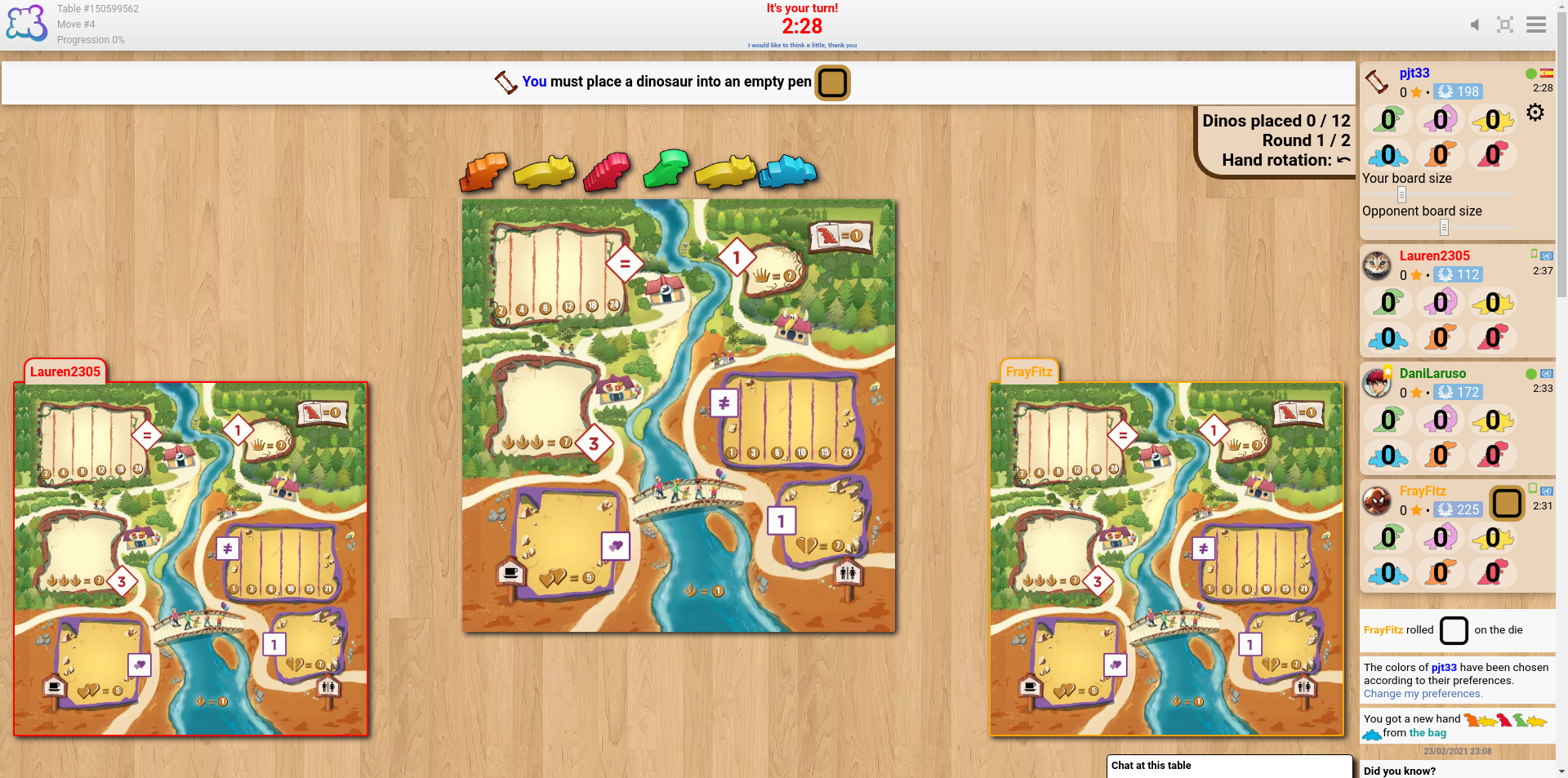
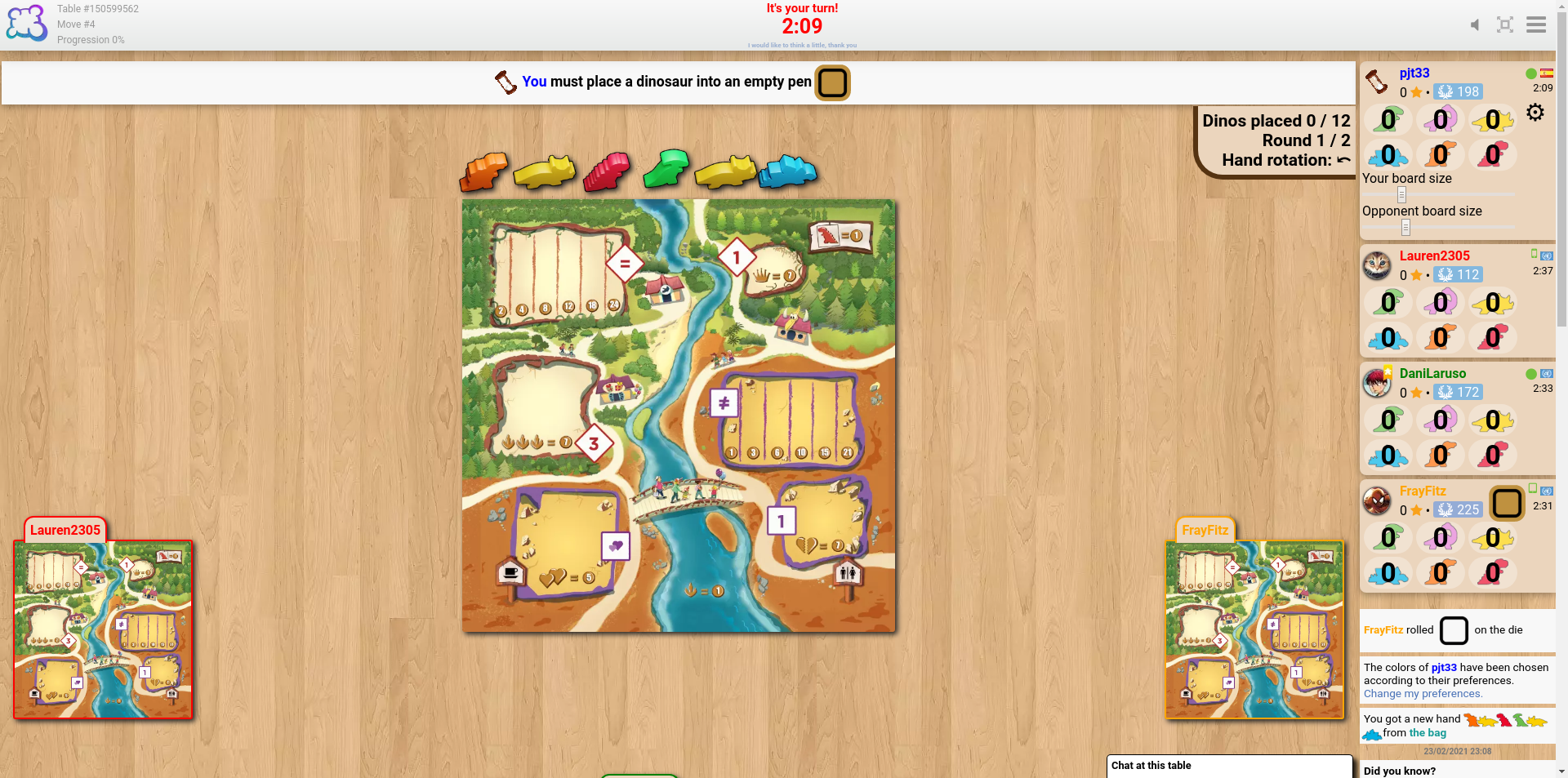
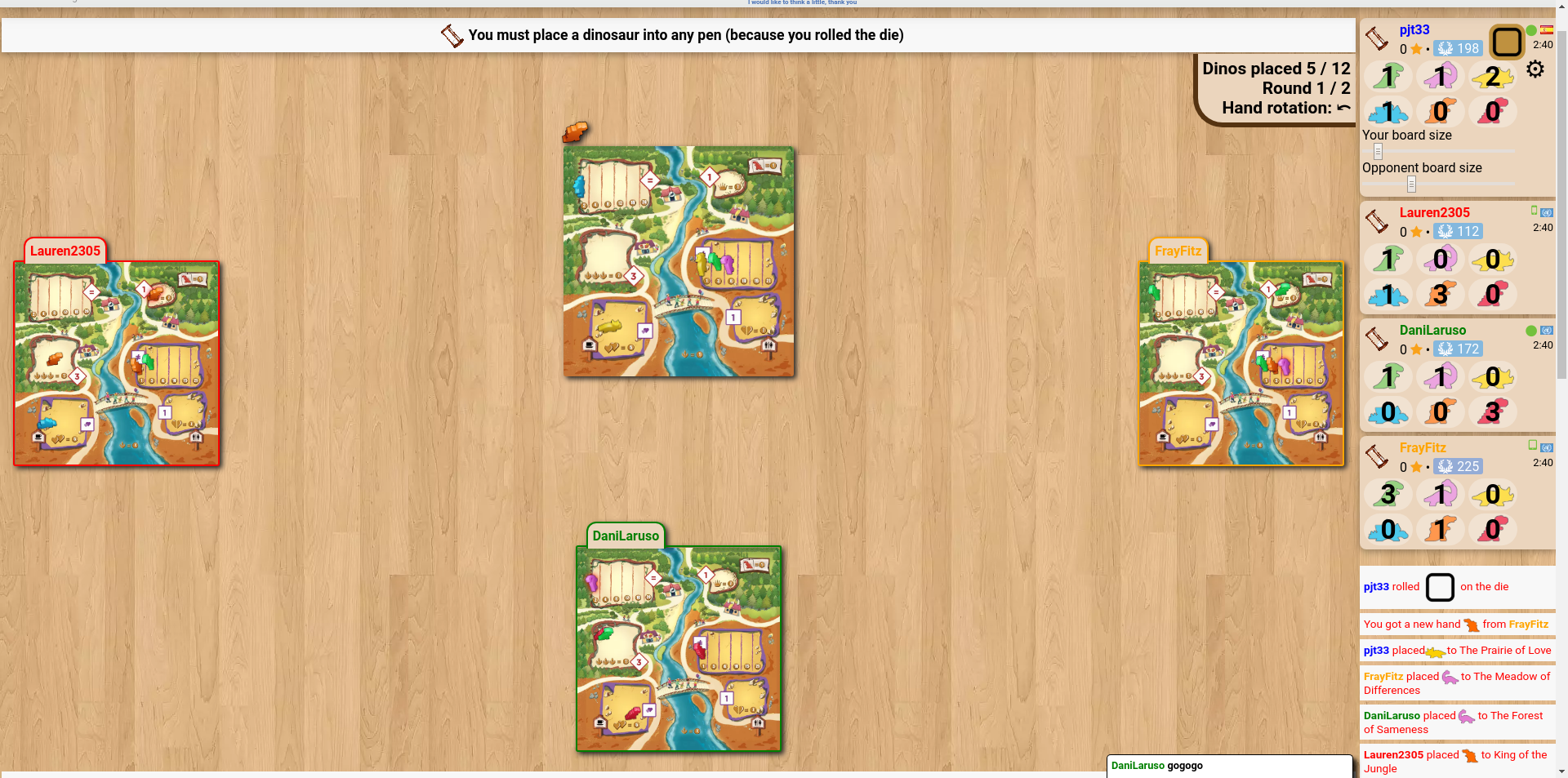
The sliders to change the sizes of the boards seem like a good idea, but my experience of trying to find a suitable size is that the problem isn't the board size but their position. It seems that the boards of the players to my left and right align with the bottom of the screen, and the boards of the fourth (and fifth, if applicable) player(s) go below the bottom of the screen unless using really tiny sizes.
cheddarmonk.org/forumimg/draftosaurus-initial-sizes.png and cheddarmonk.org/forumimg/draftosaurus-aligns-bottom.png show how making the opponent boards smaller pushes them down.
cheddarmonk.org/forumimg/draftosaurus-fixed-margin.png was the best that I could manage to get the boards to fit on screen without scrolling, and even then I had to scroll down a little and lose some of the header. This is with a maximised browser window on a 1920x1080 screen.
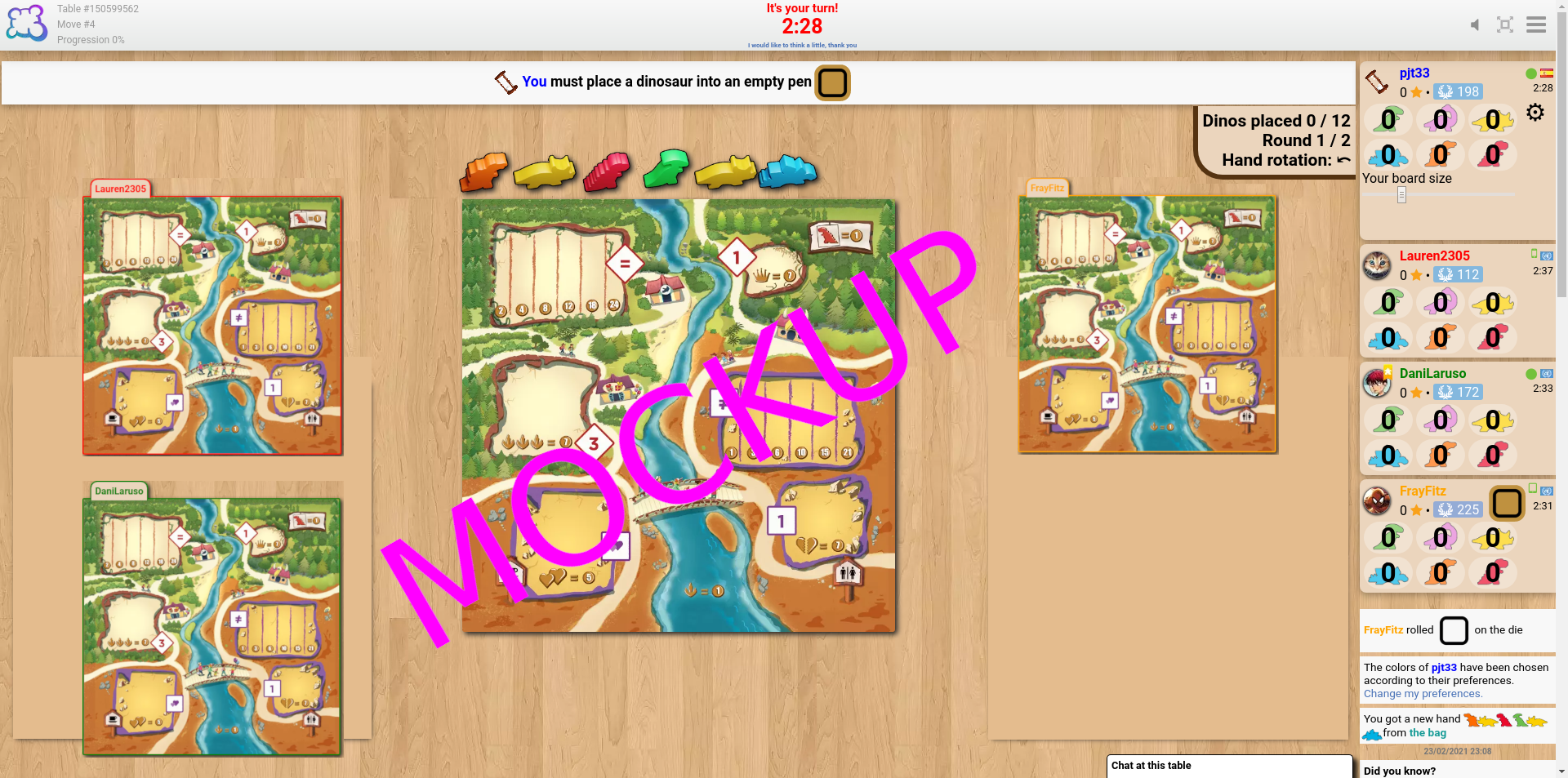
For desktop I think that it would work to have just one slider, for my own board size, and to fit the opponent boards into the left and right margins by calculating the scale factor which lets them both fit vertically, and the scale factor which lets them fit horizontally, and choosing the smaller of the two. I've made a mockup at cheddarmonk.org/forumimg/draftosaurus-mockup.png which shows how much larger the boards can be without scrolling. -
• Калі ласка, растлумачце, што вы хацелі зрабіць, што вы зрабілі і што здарылася
• Якім браўзэрам вы карыстаецеся?
Google Chrome v79
-
• Калі ласка, скапіруйце тэкст на англійскай замест перакладу на ваш мову. If you have a screenshot of this bug (good practice), you can use a picture hosting service of your choice (snipboard.io for example) to upload it and copy/paste the link here. Дзе можна знайсьці гэты тэкст у сістэме перакладу? Калі так, ці быў ён перакладзены больш за 24 гадзін таму?
The sliders to change the sizes of the boards seem like a good idea, but my experience of trying to find a suitable size is that the problem isn't the board size but their position. It seems that the boards of the players to my left and right align with the bottom of the screen, and the boards of the fourth (and fifth, if applicable) player(s) go below the bottom of the screen unless using really tiny sizes.
cheddarmonk.org/forumimg/draftosaurus-initial-sizes.png and cheddarmonk.org/forumimg/draftosaurus-aligns-bottom.png show how making the opponent boards smaller pushes them down.
cheddarmonk.org/forumimg/draftosaurus-fixed-margin.png was the best that I could manage to get the boards to fit on screen without scrolling, and even then I had to scroll down a little and lose some of the header. This is with a maximised browser window on a 1920x1080 screen.
For desktop I think that it would work to have just one slider, for my own board size, and to fit the opponent boards into the left and right margins by calculating the scale factor which lets them both fit vertically, and the scale factor which lets them fit horizontally, and choosing the smaller of the two. I've made a mockup at cheddarmonk.org/forumimg/draftosaurus-mockup.png which shows how much larger the boards can be without scrolling. • Якім браўзэрам вы карыстаецеся?
Google Chrome v79
-
• Калі ласка, дакладна і коратка апішыце сваю прапанову, каб зрабіць яе найбольш даступнай для разумення.
The sliders to change the sizes of the boards seem like a good idea, but my experience of trying to find a suitable size is that the problem isn't the board size but their position. It seems that the boards of the players to my left and right align with the bottom of the screen, and the boards of the fourth (and fifth, if applicable) player(s) go below the bottom of the screen unless using really tiny sizes.
cheddarmonk.org/forumimg/draftosaurus-initial-sizes.png and cheddarmonk.org/forumimg/draftosaurus-aligns-bottom.png show how making the opponent boards smaller pushes them down.
cheddarmonk.org/forumimg/draftosaurus-fixed-margin.png was the best that I could manage to get the boards to fit on screen without scrolling, and even then I had to scroll down a little and lose some of the header. This is with a maximised browser window on a 1920x1080 screen.
For desktop I think that it would work to have just one slider, for my own board size, and to fit the opponent boards into the left and right margins by calculating the scale factor which lets them both fit vertically, and the scale factor which lets them fit horizontally, and choosing the smaller of the two. I've made a mockup at cheddarmonk.org/forumimg/draftosaurus-mockup.png which shows how much larger the boards can be without scrolling. • Якім браўзэрам вы карыстаецеся?
Google Chrome v79
-
• Што было намалявана на экране, калі вас заблакавала? (Пусты экран? Частка гульнявога стала? Паведамленне пра памылку?)
The sliders to change the sizes of the boards seem like a good idea, but my experience of trying to find a suitable size is that the problem isn't the board size but their position. It seems that the boards of the players to my left and right align with the bottom of the screen, and the boards of the fourth (and fifth, if applicable) player(s) go below the bottom of the screen unless using really tiny sizes.
cheddarmonk.org/forumimg/draftosaurus-initial-sizes.png and cheddarmonk.org/forumimg/draftosaurus-aligns-bottom.png show how making the opponent boards smaller pushes them down.
cheddarmonk.org/forumimg/draftosaurus-fixed-margin.png was the best that I could manage to get the boards to fit on screen without scrolling, and even then I had to scroll down a little and lose some of the header. This is with a maximised browser window on a 1920x1080 screen.
For desktop I think that it would work to have just one slider, for my own board size, and to fit the opponent boards into the left and right margins by calculating the scale factor which lets them both fit vertically, and the scale factor which lets them fit horizontally, and choosing the smaller of the two. I've made a mockup at cheddarmonk.org/forumimg/draftosaurus-mockup.png which shows how much larger the boards can be without scrolling. • Якім браўзэрам вы карыстаецеся?
Google Chrome v79
-
• Якая частка правілаў не выкананая ў версіі BGA
The sliders to change the sizes of the boards seem like a good idea, but my experience of trying to find a suitable size is that the problem isn't the board size but their position. It seems that the boards of the players to my left and right align with the bottom of the screen, and the boards of the fourth (and fifth, if applicable) player(s) go below the bottom of the screen unless using really tiny sizes.
cheddarmonk.org/forumimg/draftosaurus-initial-sizes.png and cheddarmonk.org/forumimg/draftosaurus-aligns-bottom.png show how making the opponent boards smaller pushes them down.
cheddarmonk.org/forumimg/draftosaurus-fixed-margin.png was the best that I could manage to get the boards to fit on screen without scrolling, and even then I had to scroll down a little and lose some of the header. This is with a maximised browser window on a 1920x1080 screen.
For desktop I think that it would work to have just one slider, for my own board size, and to fit the opponent boards into the left and right margins by calculating the scale factor which lets them both fit vertically, and the scale factor which lets them fit horizontally, and choosing the smaller of the two. I've made a mockup at cheddarmonk.org/forumimg/draftosaurus-mockup.png which shows how much larger the boards can be without scrolling. -
• Ці відаць парушэнне правілаў у паўторы гульні? Калі так, то на якім хаду?
• Якім браўзэрам вы карыстаецеся?
Google Chrome v79
-
• Якое гульнявое дзеянне вы хацелі зрабіць?
The sliders to change the sizes of the boards seem like a good idea, but my experience of trying to find a suitable size is that the problem isn't the board size but their position. It seems that the boards of the players to my left and right align with the bottom of the screen, and the boards of the fourth (and fifth, if applicable) player(s) go below the bottom of the screen unless using really tiny sizes.
cheddarmonk.org/forumimg/draftosaurus-initial-sizes.png and cheddarmonk.org/forumimg/draftosaurus-aligns-bottom.png show how making the opponent boards smaller pushes them down.
cheddarmonk.org/forumimg/draftosaurus-fixed-margin.png was the best that I could manage to get the boards to fit on screen without scrolling, and even then I had to scroll down a little and lose some of the header. This is with a maximised browser window on a 1920x1080 screen.
For desktop I think that it would work to have just one slider, for my own board size, and to fit the opponent boards into the left and right margins by calculating the scale factor which lets them both fit vertically, and the scale factor which lets them fit horizontally, and choosing the smaller of the two. I've made a mockup at cheddarmonk.org/forumimg/draftosaurus-mockup.png which shows how much larger the boards can be without scrolling. -
• Што вы спрабавалі зрабіць, каб выканаць гэтае гульнявое дзеянне?
-
• Што адбылося, калі вы паспрабавалі зрабіць гэта (паведамленне пра памылку, паведамленне ў радку стану гульні ...)?
• Якім браўзэрам вы карыстаецеся?
Google Chrome v79
-
• На якім кроку гульні адбылася праблема (якая была інструкцыя ў той момант у гульні)?
The sliders to change the sizes of the boards seem like a good idea, but my experience of trying to find a suitable size is that the problem isn't the board size but their position. It seems that the boards of the players to my left and right align with the bottom of the screen, and the boards of the fourth (and fifth, if applicable) player(s) go below the bottom of the screen unless using really tiny sizes.
cheddarmonk.org/forumimg/draftosaurus-initial-sizes.png and cheddarmonk.org/forumimg/draftosaurus-aligns-bottom.png show how making the opponent boards smaller pushes them down.
cheddarmonk.org/forumimg/draftosaurus-fixed-margin.png was the best that I could manage to get the boards to fit on screen without scrolling, and even then I had to scroll down a little and lose some of the header. This is with a maximised browser window on a 1920x1080 screen.
For desktop I think that it would work to have just one slider, for my own board size, and to fit the opponent boards into the left and right margins by calculating the scale factor which lets them both fit vertically, and the scale factor which lets them fit horizontally, and choosing the smaller of the two. I've made a mockup at cheddarmonk.org/forumimg/draftosaurus-mockup.png which shows how much larger the boards can be without scrolling. -
• Што адбылося, калі вы паспрабавалі здзейсніць гульнявое дзеянне (паведамленне пра памылку, паведамленне ў радку стану гульні ...)?
• Якім браўзэрам вы карыстаецеся?
Google Chrome v79
-
• Калі ласка, апішыце памылку адлюстравання. If you have a screenshot of this bug (good practice), you can use a picture hosting service of your choice (snipboard.io for example) to upload it and copy/paste the link here.
The sliders to change the sizes of the boards seem like a good idea, but my experience of trying to find a suitable size is that the problem isn't the board size but their position. It seems that the boards of the players to my left and right align with the bottom of the screen, and the boards of the fourth (and fifth, if applicable) player(s) go below the bottom of the screen unless using really tiny sizes.
cheddarmonk.org/forumimg/draftosaurus-initial-sizes.png and cheddarmonk.org/forumimg/draftosaurus-aligns-bottom.png show how making the opponent boards smaller pushes them down.
cheddarmonk.org/forumimg/draftosaurus-fixed-margin.png was the best that I could manage to get the boards to fit on screen without scrolling, and even then I had to scroll down a little and lose some of the header. This is with a maximised browser window on a 1920x1080 screen.
For desktop I think that it would work to have just one slider, for my own board size, and to fit the opponent boards into the left and right margins by calculating the scale factor which lets them both fit vertically, and the scale factor which lets them fit horizontally, and choosing the smaller of the two. I've made a mockup at cheddarmonk.org/forumimg/draftosaurus-mockup.png which shows how much larger the boards can be without scrolling. • Якім браўзэрам вы карыстаецеся?
Google Chrome v79
-
• Калі ласка, скапіруйце тэкст на англійскай замест перакладу на ваш мову. If you have a screenshot of this bug (good practice), you can use a picture hosting service of your choice (snipboard.io for example) to upload it and copy/paste the link here. Дзе можна знайсьці гэты тэкст у сістэме перакладу? Калі так, ці быў ён перакладзены больш за 24 гадзін таму?
The sliders to change the sizes of the boards seem like a good idea, but my experience of trying to find a suitable size is that the problem isn't the board size but their position. It seems that the boards of the players to my left and right align with the bottom of the screen, and the boards of the fourth (and fifth, if applicable) player(s) go below the bottom of the screen unless using really tiny sizes.
cheddarmonk.org/forumimg/draftosaurus-initial-sizes.png and cheddarmonk.org/forumimg/draftosaurus-aligns-bottom.png show how making the opponent boards smaller pushes them down.
cheddarmonk.org/forumimg/draftosaurus-fixed-margin.png was the best that I could manage to get the boards to fit on screen without scrolling, and even then I had to scroll down a little and lose some of the header. This is with a maximised browser window on a 1920x1080 screen.
For desktop I think that it would work to have just one slider, for my own board size, and to fit the opponent boards into the left and right margins by calculating the scale factor which lets them both fit vertically, and the scale factor which lets them fit horizontally, and choosing the smaller of the two. I've made a mockup at cheddarmonk.org/forumimg/draftosaurus-mockup.png which shows how much larger the boards can be without scrolling. • Якім браўзэрам вы карыстаецеся?
Google Chrome v79
-
• Калі ласка, дакладна і коратка апішыце сваю прапанову, каб зрабіць яе найбольш даступнай для разумення.
The sliders to change the sizes of the boards seem like a good idea, but my experience of trying to find a suitable size is that the problem isn't the board size but their position. It seems that the boards of the players to my left and right align with the bottom of the screen, and the boards of the fourth (and fifth, if applicable) player(s) go below the bottom of the screen unless using really tiny sizes.
cheddarmonk.org/forumimg/draftosaurus-initial-sizes.png and cheddarmonk.org/forumimg/draftosaurus-aligns-bottom.png show how making the opponent boards smaller pushes them down.
cheddarmonk.org/forumimg/draftosaurus-fixed-margin.png was the best that I could manage to get the boards to fit on screen without scrolling, and even then I had to scroll down a little and lose some of the header. This is with a maximised browser window on a 1920x1080 screen.
For desktop I think that it would work to have just one slider, for my own board size, and to fit the opponent boards into the left and right margins by calculating the scale factor which lets them both fit vertically, and the scale factor which lets them fit horizontally, and choosing the smaller of the two. I've made a mockup at cheddarmonk.org/forumimg/draftosaurus-mockup.png which shows how much larger the boards can be without scrolling. • Якім браўзэрам вы карыстаецеся?
Google Chrome v79
Гісторыя справаздачы
I think laying our the boards in the same way as the game Lucky Numbers would be beneficial, as all of the boards are the same size and can be viewed at once without either resizing or scrolling.
Дадайце да гэтага дакладу
- Іншая Табліца ID / ID ходу
- Ці F5 вырашыла Вашу праблему?
- Ці з'яўлялася праблема некалькі разоў? Кожны раз? Выпадкова?
- If you have a screenshot of this bug (good practice), you can use a picture hosting service of your choice (snipboard.io for example) to upload it and copy/paste the link here.